Lisa AI Speech Analytics
Overview
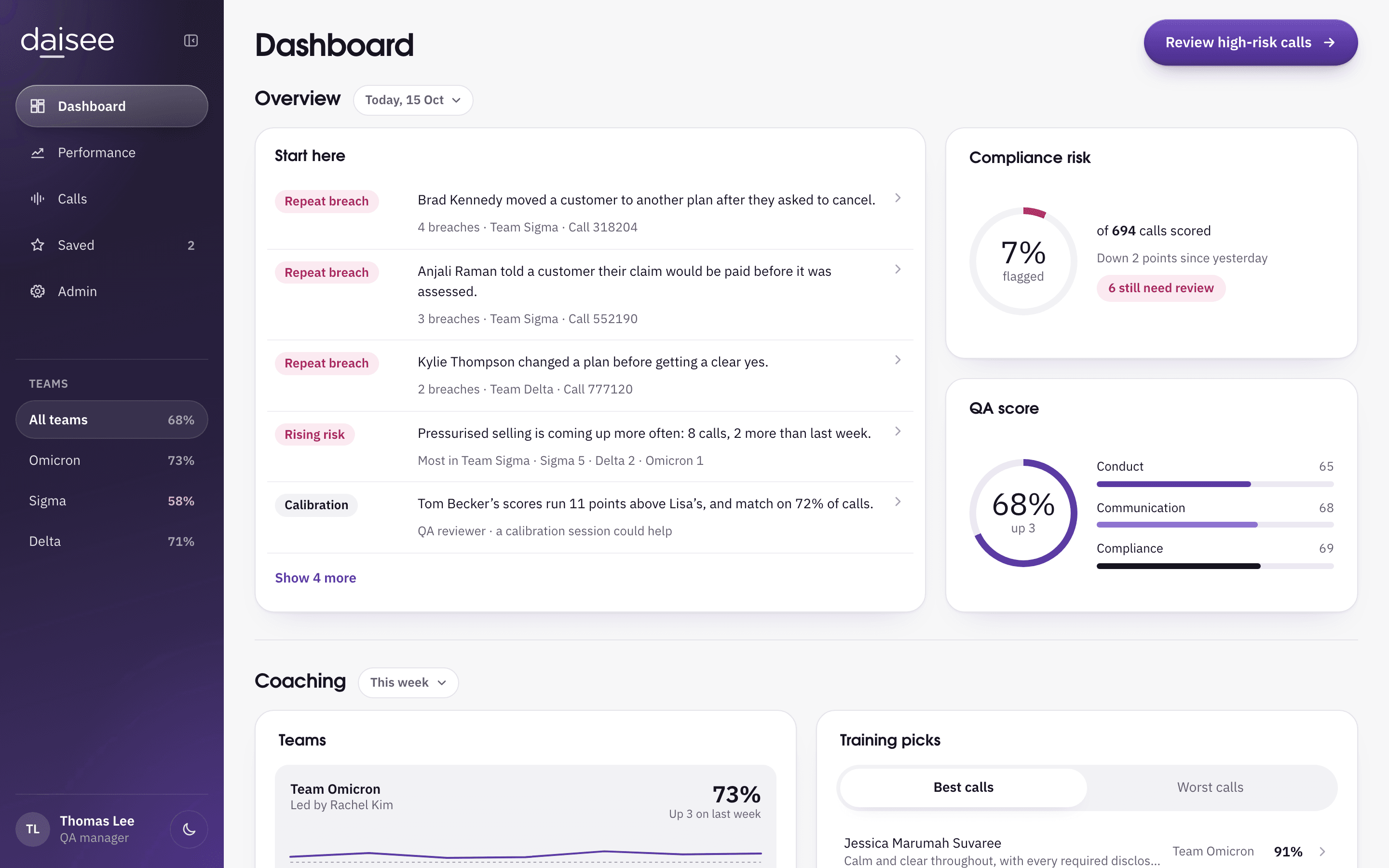
Lisa is an AI speech analytics tool I designed for daisee in 2018. Call centre Quality Assurance teams could review only a small share of their calls, and heard about compliance breaches late, often by word of mouth.
In 2026 I rebuilt it in Claude Design to see how far I could push a prototype, with a modern look, motion, and voices made with ElevenLabs.
- Role
- Senior UX Designer
- Client
- daisee
- Year
- 2018
Lisa finds the one call worth hearing

What users said in research
“(With Lisa) I wouldn’t have to listen to 10 calls to catch one bad call”

The problem
QA teams reviewed only a
fraction of their calls, and
daisee’s earlier Qlik build
could not be deployed
The problem space
Call centre businesses, their QA teams and daisee each had a different problem to solve.
- Business problem
2 to 5%of calls are ever reviewed
Businesses pay a lot to monitor calls for compliance breaches, and none of them can listen to every conversation.
The calls nobody hears leave them open to rogue agents, unqualified sales and regulatory fines. The quality management scorecards that managers use cover only a few conversational factors.
- User problem
Hundredsof calls evaluated to spot a trend by hand
QA Managers and Officers moved between separate systems to gather data, give agents feedback and prepare training.
A compliance breach reached them by word of mouth or at a later evaluation, so the fix came late. Spotting trends in agent behaviour and script adherence meant evaluating hundreds of calls and a lot of detective work.
- The challenge
4 weeksto produce a deployable product
The product daisee had built in Qlik could not be deployed or integrated with call centres’ systems, and it did not serve QA Managers, Team Leaders and Officers.
daisee needed a deployable product to raise investment and show potential clients, and its development team had no product management, cross functional or agile process to help it move faster.
What success had to look like
These are targets, not results. The business needed a deployable MVP within 4 weeks, ready to show investors and potential clients, and a move from reviewing a 2 to 5% sample of calls towards scoring every call. The targets below come from user problems, or from something users asked for in research.
Compliance
- Breach alerts
- A breach had to reach the QA team as it happened, not at a later evaluation
- Derived from the user problem, and what users said they want
- Repeat breaches
- Agents who repeat breaches had to be flagged without manual detective work
- Derived from what users said they want
- Compliance targets. Breach alerts: A breach had to reach the QA team as it happened, not at a later evaluation. Derived from the user problem, and what users said they want. Repeat breaches: Agents who repeat breaches had to be flagged without manual detective work. Derived from what users said they want.
- Coaching and adoption targets. Calls worth coaching: A team leader had to find the calls worth coaching on without listening to them in full. Derived from what users said they want, and a Customer Success Manager’s comment. One place: QA work had to live in one place, so Lisa was not “yet another system”. Derived from what would stop people using Lisa. Trusted scores: QA staff had to trust the scores enough to act on them, seeing the answer first and drilling down only when they needed to. Derived from what would stop people using Lisa.
Compliance
- Breach alerts
- A breach had to reach the QA team as it happened, not at a later evaluation
- Derived from the user problem, and what users said they want
- Repeat breaches
- Agents who repeat breaches had to be flagged without manual detective work
- Derived from what users said they want
Coaching and adoption
- Calls worth coaching
- A team leader had to find the calls worth coaching on without listening to them in full
- Derived from what users said they want, and a Customer Success Manager’s comment
- One place
- QA work had to live in one place, so Lisa was not “yet another system”
- Derived from what would stop people using Lisa
- Trusted scores
- QA staff had to trust the scores enough to act on them, seeing the answer first and drilling down only when they needed to
- Derived from what would stop people using Lisa

The approach
User research
Personas
Task analysis
User journey
Information architecture
Sketches
User research
I planned and ran interviews with early adopters and potential clients, and gathered their first impressions of the Qlik prototype.
Objectives
- Validate assumptions on what to build
- Craft and align the product vision among stakeholders
- Identify the users, their needs and pain points
- Understand the user’s mental model for each task
Methods
In depth interviews
Covered each participant’s business background, then their needs and pain points.
Feedback on the Qlik screens
Product opportunity questions, then product reaction questions.
Who I spoke to
- Senior QA Specialist
- Customer Success Manager
- Customer Care Manager
- Head of Operations
I interviewed three of them in depth, and all four gave feedback on the Qlik screens.
Key themes
The themes that came out of the research shaped which features to build.
- Actionable insights
- Coaching opportunities
- Compliance
- Triage
Personas
The research produced four personas: three who review calls and one who makes them. The reviewers needed to search calls for what was and was not said, to check that agents kept to the script.
Reviews the calls
QA Specialist, 41
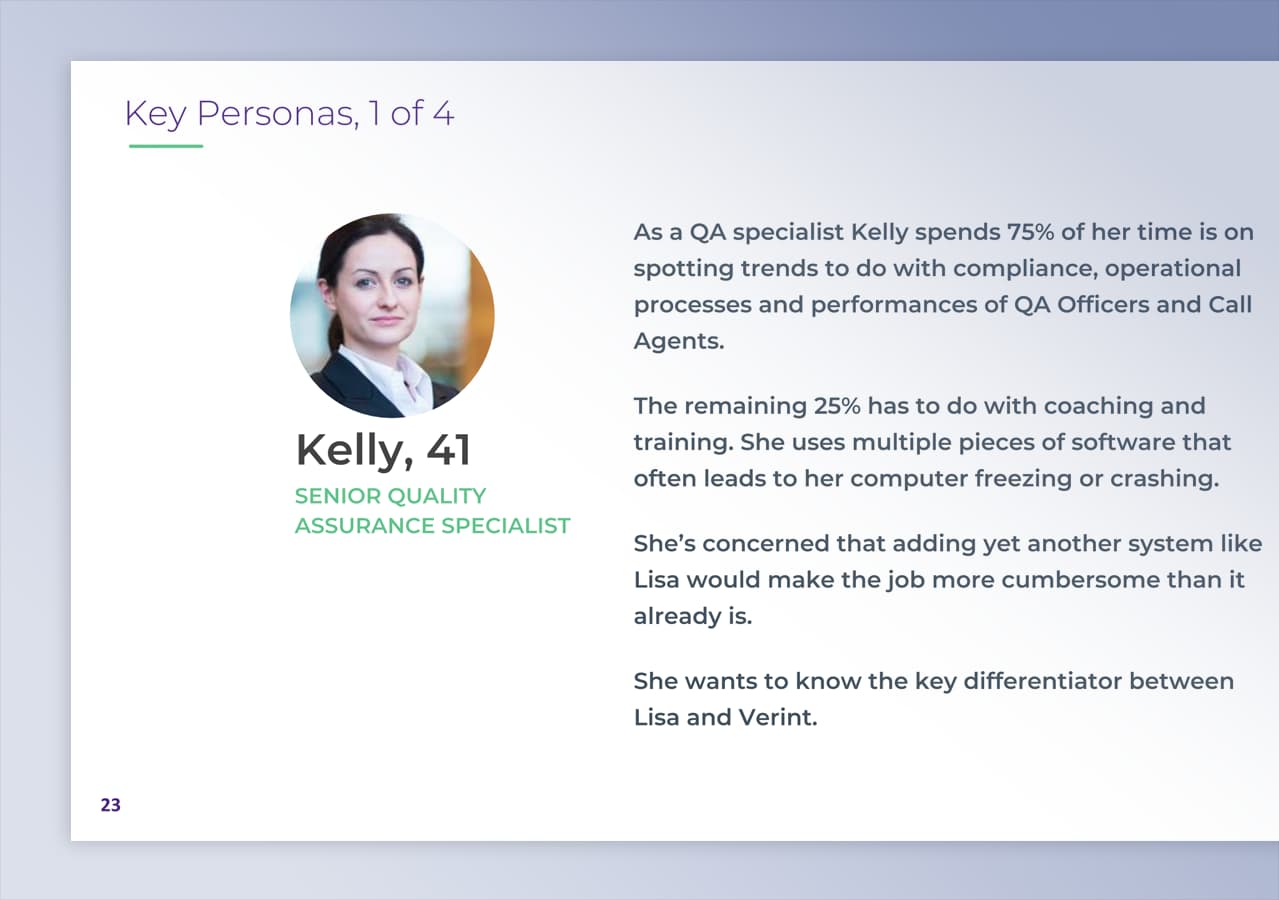
The QA Specialist spends 75% of her time spotting trends in compliance, operational processes and the performance of QA Officers and call agents. The other 25% goes to coaching and training.
She wants to know what sets Lisa apart from Verint.
Concerns
- She runs so many pieces of software that her computer often freezes or crashes
- Adding yet another system like Lisa could make the job more cumbersome than it already is
Needs
- Run a report after a week of sales or cancellations, to feed QA trends in with business outcomes
- Analyse agent performance
- Search calls with key word logic
- Measure customer satisfaction
- Drill down to spot best practice and training needs, agent by agent or across the whole business
- QA Specialist, 41. Reviews the calls. The QA Specialist spends 75% of her time spotting trends in compliance, operational processes and the performance of QA Officers and call agents. The other 25% goes to coaching and training. She wants to know what sets Lisa apart from Verint. Concerns: She runs so many pieces of software that her computer often freezes or crashes Adding yet another system like Lisa could make the job more cumbersome than it already is Needs: Run a report after a week of sales or cancellations, to feed QA trends in with business outcomes Analyse agent performance Search calls with key word logic Measure customer satisfaction Drill down to spot best practice and training needs, agent by agent or across the whole business
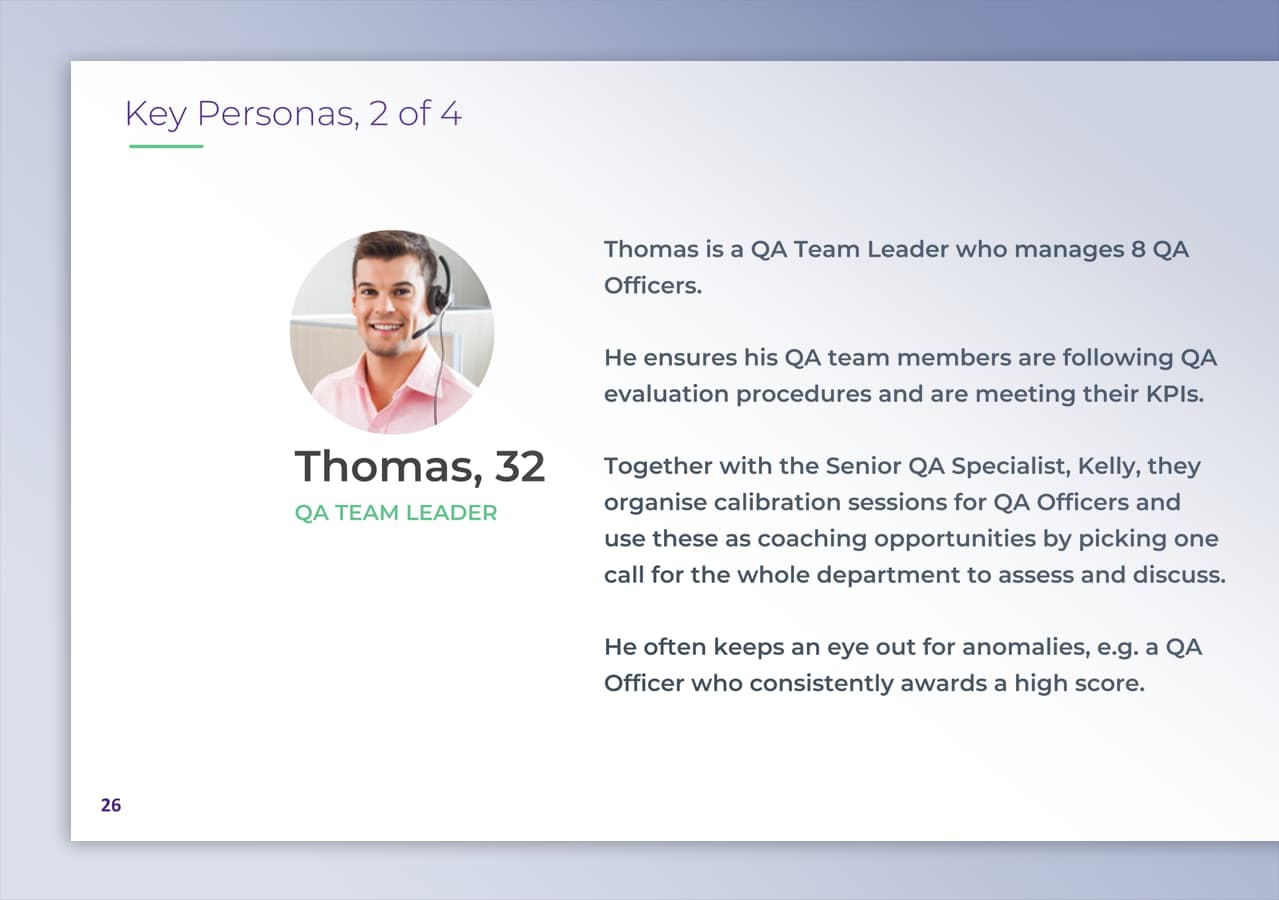
- Thomas, 32. Reviews the calls. Thomas manages 8 QA Officers. He makes sure they follow QA evaluation procedures and meet their KPIs. With the QA Specialist he runs calibration sessions for the QA Officers, picking one call for the whole department to assess and discuss. Goals: Keep his team to QA evaluation procedures and their KPIs Use calibration sessions as coaching opportunities Catch anomalies, such as a QA Officer who always awards a high score Needs: Listen to calls and review the transcription Understand semantics and meaning Tell overtalk apart from interruptions Spot best practice and assess training needs
- Aanya, 25. Reviews the calls. Aanya evaluates recorded calls made by sales call agents. She checks her email often for changes to the QA scoring criteria, and Confluence for the latest scripts. Goals: Uncover areas of improvement for the agent Find the sources of customer unhappiness Find opportunities to improve sales and customer loyalty
- Joseph, 17. Makes the calls. Joseph handles inbound calls and makes outbound ones. Every week or fortnight he attends a QA refresher, where the QA Team Leader runs through his performance report to point out errors and areas for improvement. Goals: Solve customer issues efficiently on inbound calls Increase customer satisfaction Never breach compliance regulations On outbound calls, keep the customer experience good enough to prevent inbound calls


Reviews the calls
QA Specialist, 41
The QA Specialist spends 75% of her time spotting trends in compliance, operational processes and the performance of QA Officers and call agents. The other 25% goes to coaching and training.
She wants to know what sets Lisa apart from Verint.
Concerns
- She runs so many pieces of software that her computer often freezes or crashes
- Adding yet another system like Lisa could make the job more cumbersome than it already is
Needs
- Run a report after a week of sales or cancellations, to feed QA trends in with business outcomes
- Analyse agent performance
- Search calls with key word logic
- Measure customer satisfaction
- Drill down to spot best practice and training needs, agent by agent or across the whole business
Task analysis
Each persona has a task analysis that traces their tasks to the questions behind them and the steps that follow.
- Task
- Question
- Sub task
- Who
QA Specialist
Investigate performance trends in the QA team
- What are the repeated questions that get asked by my teams?
- Who is under or over performing, evaluating the least or most calls?
- Which QA Officer is giving high scores all the time?
Who: QA Officers
Number of sales calls evaluated against not evaluated
Who: Teams or individuals
Investigate QA trends
Look at high premium calls
- Who is repeating errors in compliance?
- How have the scores been trending?
Who: Outbound sales agents
Prepare reports on trends
Report back to the Head of QA
Coaching and training
Listen, spot check and evaluate calls on Verint
Who: Best and worst
Edit audio into clips with Audacity
Also: Performance reports, sent by email to teams or individuals
Prepare coaching materials in PowerPoint
Sit in QA calibration sessions and one to one coaching
Discuss issues and trends
Upload scoring criteria to Verint
Check that the criteria update on the front end
Email to announce changes of markings
Who: Teams or individuals
Update scripts in a Word document
Share on Confluence, or as Word or PDF
Who: Teams or individuals
Both investigations meet at
Show me the outliers
Who: Teams or individuals
Listen, spot check and evaluate calls on Verint
Who: Best and worst
Coaching and training
- QA Specialist, QA Specialist. Investigate performance trends in the QA team. What are the repeated questions that get asked by my teams?. Who is under or over performing, evaluating the least or most calls?. Which QA Officer is giving high scores all the time?. Number of sales calls evaluated against not evaluated Investigate QA trends. Look at high premium calls. Who is repeating errors in compliance?. How have the scores been trending? Prepare reports on trends. Report back to the Head of QA Coaching and training. Listen, spot check and evaluate calls on Verint. Edit audio into clips with Audacity. Prepare coaching materials in PowerPoint. Sit in QA calibration sessions and one to one coaching. Discuss issues and trends Upload scoring criteria to Verint. Check that the criteria update on the front end. Email to announce changes of markings Update scripts in a Word document. Share on Confluence, or as Word or PDF
- Thomas, QA Team Leader. Ensure my team is performing to QA procedures. Who is under or over performing, evaluating the least or most calls?. Are they marking calls accurately?. Are they providing actionable feedback to call agents? Assess risks in calls. Look at high premium calls. Who is repeating errors in compliance?. How have the scores been trending? Look for anomalies. Which QA Officer is giving high scores all the time? Coaching and training. Listen, spot check and evaluate calls on Verint. Edit audio into clips with Audacity. Prepare coaching materials in PowerPoint. QA calibration sessions and one to one coaching. Discuss issues and trends Look out for frequent announcements on the latest scoring criteria. Check emails and Verint Refer to the script. Refer to Confluence, Word or PDF
- Aanya, QA Officer. Check email for the latest scoring criteria. What are the changes in scoring criteria?. Reference the scoring criteria when evaluating Evaluate a number of high risk calls within a timeframe. What are the errors in compliance in each call?. Listen to and evaluate calls on Verint. Reference the scoring criteria. Give a score to the highlighted section Check Confluence for the latest scripting. What are the changes in the script?. Reference the script for marking. Highlight a section in the call’s transcript. Provide feedback on that section. Compute it into a performance report. Email the report to the agent for self assessment
- Joseph, Call agent. Inbound calls. How can I solve the customer’s issue?. Receive the customer’s issue. Resolve the customer’s issue. Input information about the call onto the system Outbound calls, check up. Does the customer have any outstanding issues?. Ask whether the customer has any issues. Resolve the customer’s issue. Input information about the call onto the system Outbound calls, sales. How can I make this sale?. Deliver the mandatory script. Sell. Request customer or payment details. Input information about the call onto the system Attend a coaching session. How can I improve my skills?. Discuss errors and areas of improvement from the performance report. Implement the solutions generated
What would prevent people from using Lisa?
Proof of accuracy
They need evidence of how sentiment is derived and how accurate the scoring is.
Recommendation
Inputs from engineers and data scientists.
Yet another system
They are tired of “yet another system” and worried about integration.
Tools they already juggle: Breach Register, Verint, Evolve, Word and PDF, Confluence, Excel, PowerPoint, Audacity, Outlook, intranets and Jira.
Recommendation
A single, reliable ecosystem.
Too much data
They are paralysed by data.
“My one reservation is that there’d be so much here.. you probably want to have that AI to go, hey maybe start here”
Head of Operations Recommendation
Surface immediate, actionable insight in the user’s language.
Sentiment is not enough
Sentiment data alone is not enough.
Recommendation
Surface the scripting that improves customer sentiment.
User journey
This journey is drawn only from the task analyses and the four scenarios. It adds no step or feeling that they don’t contain.
Drawn from the task analyses of the QA Specialist, Thomas and Aanya.
Keep up with criteria and scripts
QA Specialist
Uploads scoring criteria to Verint, checks they update on the front end, and emails teams to announce changes of markings.
Updates scripts in a Word document and shares them on Confluence, or as Word or PDF.
QA Team Leader
Looks out for announcements on the latest scoring criteria in email and Verint, and refers to the script on Confluence, Word or PDF.
QA Officer
Checks email for changes in scoring criteria, and Confluence for changes in the script.
- Keep up with criteria and scripts. QA Specialist: Uploads scoring criteria to Verint, checks they update on the front end, and emails teams to announce changes of markings. Updates scripts in a Word document and shares them on Confluence, or as Word or PDF.. QA Team Leader: Looks out for announcements on the latest scoring criteria in email and Verint, and refers to the script on Confluence, Word or PDF.. QA Officer: Checks email for changes in scoring criteria, and Confluence for changes in the script..
- Find the calls that matter. QA Specialist: Investigates performance trends in the QA team and QA trends across outbound sales agents: high premium calls, repeated compliance errors, how scores are trending.. QA Team Leader: Checks the team performs to QA procedures, assesses risks in high premium calls, and looks for anomalies such as a QA Officer giving high scores all the time.. QA Officer: Evaluates a number of high risk calls within a timeframe, asking what the errors in compliance are in each call..
- Evaluate and report. QA Specialist: Show me the outliers, then Listen, spot check and evaluate the best and worst calls on Verint. Separately: Prepare reports on trends, then Report back to the Head of QA. QA Team Leader: Show me the outliers, then Report trends to the QA Specialist. Separately: Flick good and bad examples of calls over to the QA Specialist. QA Officer: Listen to and evaluate calls on Verint, then Highlight a section of the transcript, then Score it and give feedback, then Compute a performance report, then Email it to the agent for self assessment.
- Coach. QA Specialist: Edit audio into clips with Audacity, then Prepare coaching materials in PowerPoint, then QA calibration sessions and one to one coaching, then Discuss issues and trends. QA Team Leader: Edit audio into clips with Audacity, then Prepare coaching materials in PowerPoint, then QA calibration sessions and one to one coaching. Separately: Send performance reports by email.
Stage
Keep up with criteria and scripts
Uploads scoring criteria to Verint, checks they update on the front end, and emails teams to announce changes of markings.
Updates scripts in a Word document and shares them on Confluence, or as Word or PDF.
Looks out for announcements on the latest scoring criteria in email and Verint, and refers to the script on Confluence, Word or PDF.
Checks email for changes in scoring criteria, and Confluence for changes in the script.
Find the calls that matter
Investigates performance trends in the QA team and QA trends across outbound sales agents: high premium calls, repeated compliance errors, how scores are trending.
Checks the team performs to QA procedures, assesses risks in high premium calls, and looks for anomalies such as a QA Officer giving high scores all the time.
Evaluates a number of high risk calls within a timeframe, asking what the errors in compliance are in each call.
Evaluate and report
- Show me the outliers
- Listen, spot check and evaluate the best and worst calls on Verint
- Prepare reports on trends
- Report back to the Head of QA
- Show me the outliers
- Report trends to the QA Specialist
- Flick good and bad examples of calls over to the QA Specialist
- Listen to and evaluate calls on Verint
- Highlight a section of the transcript
- Score it and give feedback
- Compute a performance report
- Email it to the agent for self assessment
Coach
- Edit audio into clips with Audacity
- Prepare coaching materials in PowerPoint
- QA calibration sessions and one to one coaching
- Discuss issues and trends
- Edit audio into clips with Audacity
- Prepare coaching materials in PowerPoint
- QA calibration sessions and one to one coaching
- Send performance reports by email
Information architecture
I redrew the IA to match the 2026 rebuild. The dashboard opens on what needs attention first, and every call opens on what Lisa found, so a QA manager can play the moment behind a score straight away.
QA manager
Dashboard
StartShows
Start here
Compliance risk and QA score
Coaching
Scores by team or agent, and training picks
Customers
Why they called and how they felt
Navigation
Performance
Desktop onlyWhere to focus
By team and period
Views
Risks
By type, repeat breaches, what upset customers
Skills
Agents
QA reviewers
Admin
Desktop onlySections
Scoring criteria
Scripts and phrases
Required disclosures, phrases to avoid, phrases worth sharing
Alerts
Teams and people
Review sampling
Data and privacy
Integrations
Calls
Every deviceCall list
All or high risk, sorted and filtered
Saved calls
Every deviceCall list
Saved calls, sorted and filtered
Low fidelity sketches
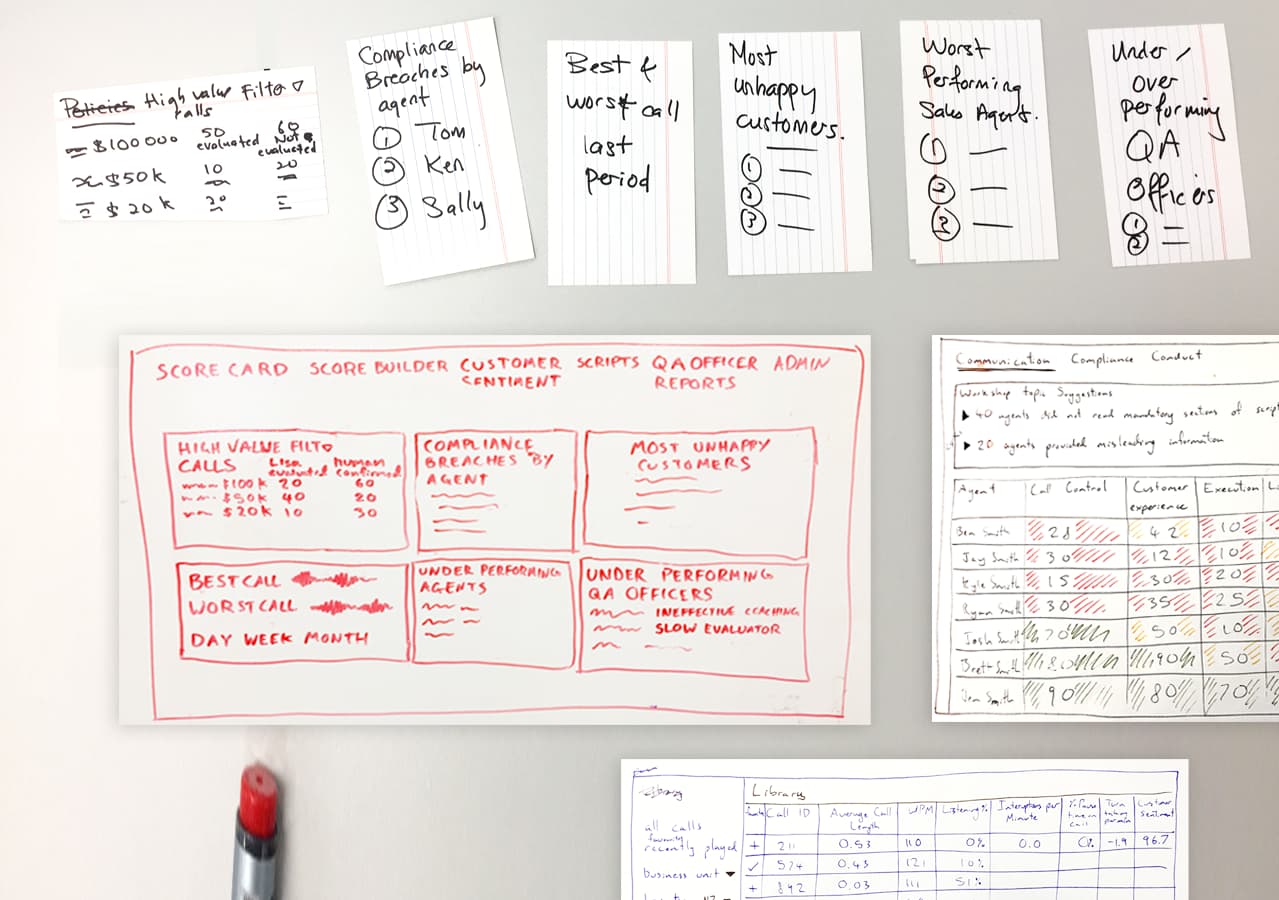
Daniel Benhar and I sketched the screens from the research and the IA, with ideas from the cross functional team.

Key design decisions
Each screen answers a need that came out of the research.
Breach alerts
Research need: immediate alerts when a compliance breach occurs, and a flag on agents who repeat breaches.
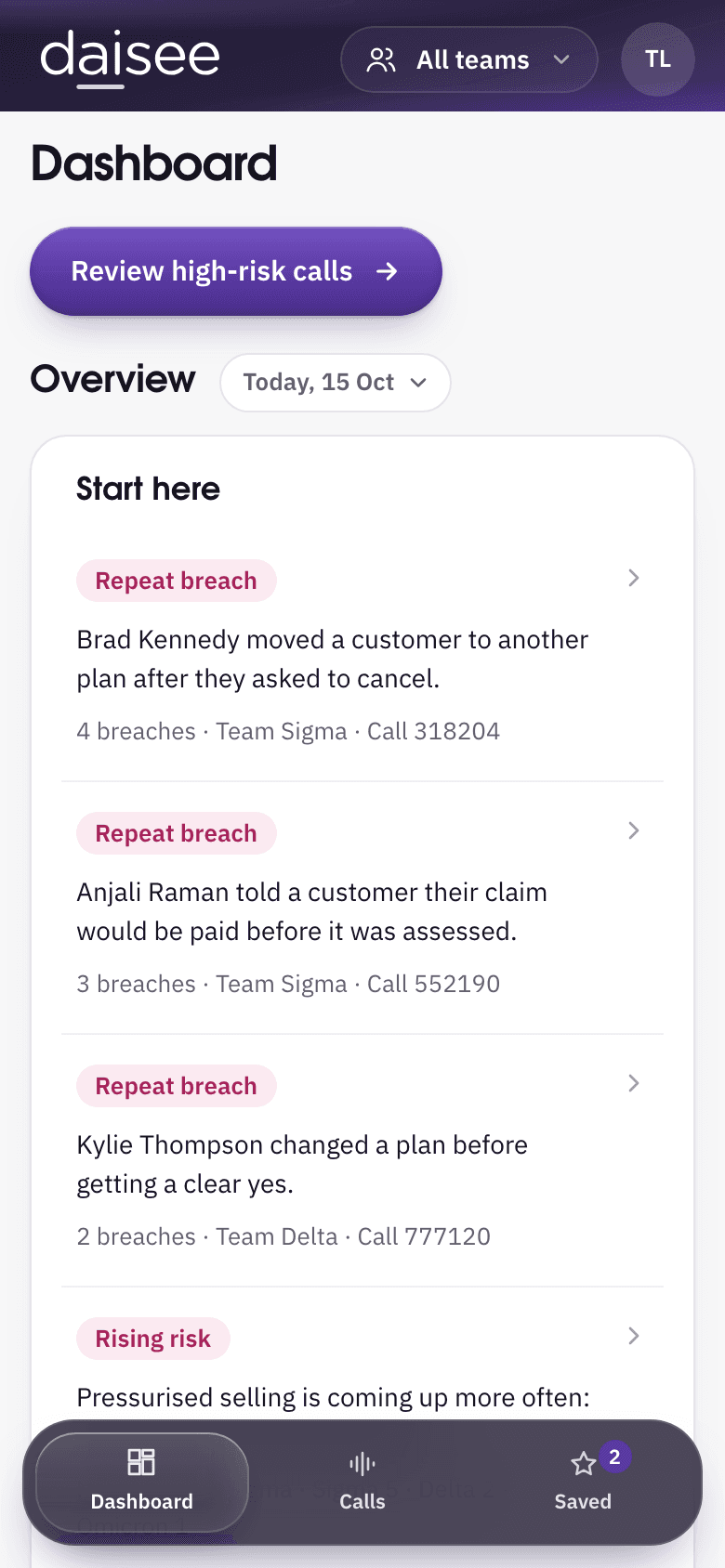
The dashboard lists agents with two or more compliance breaches this week. On a phone, breaches and complaints arrive as they happen.
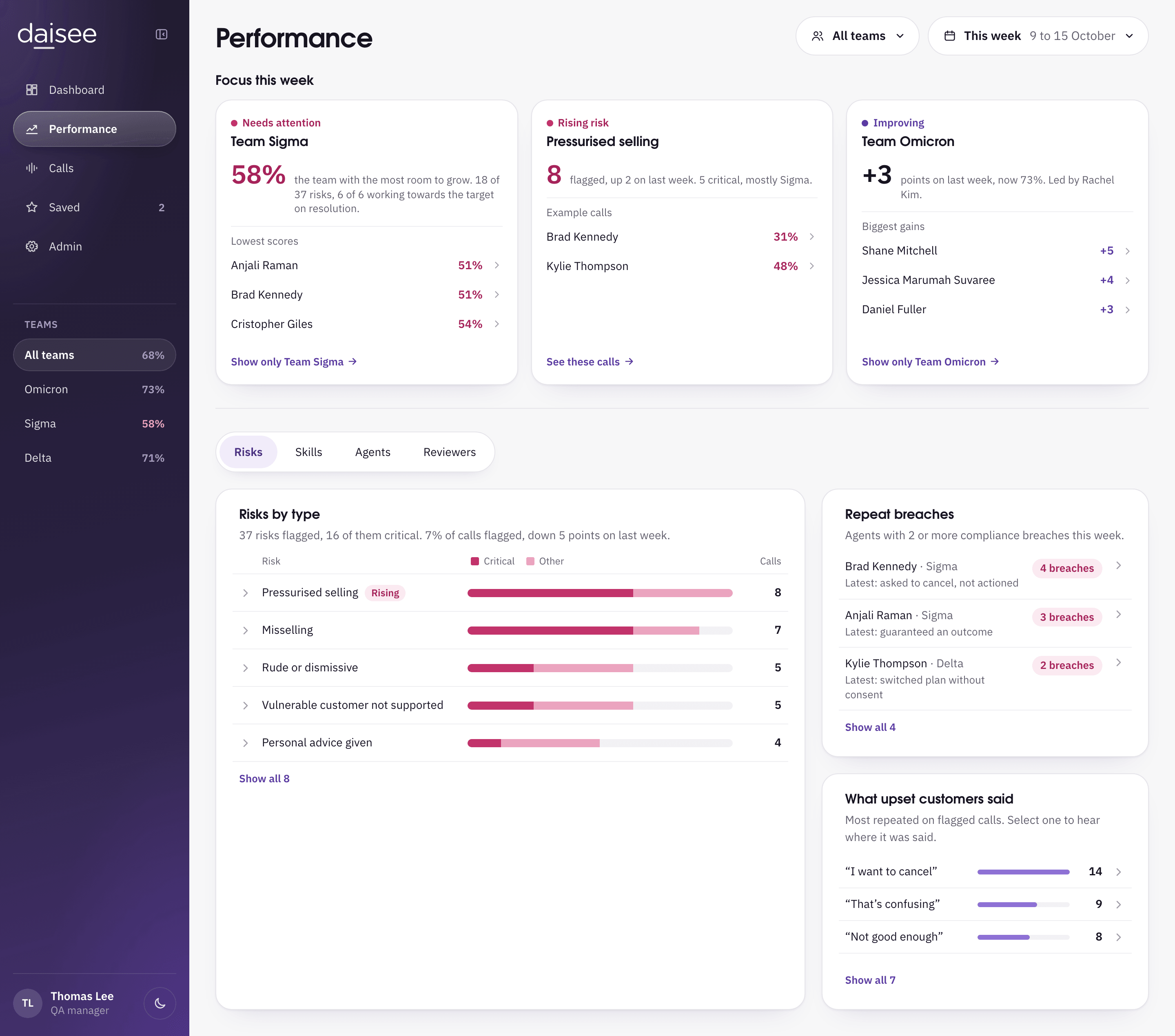
- Performance page in Lisa: Focus this week, then Risks by type beside Repeat breaches, agents with 2 or more compliance breaches this week. From the 2026 build made in Claude Design.
Coaching moments
Research need: insights for coaching without listening to long calls.
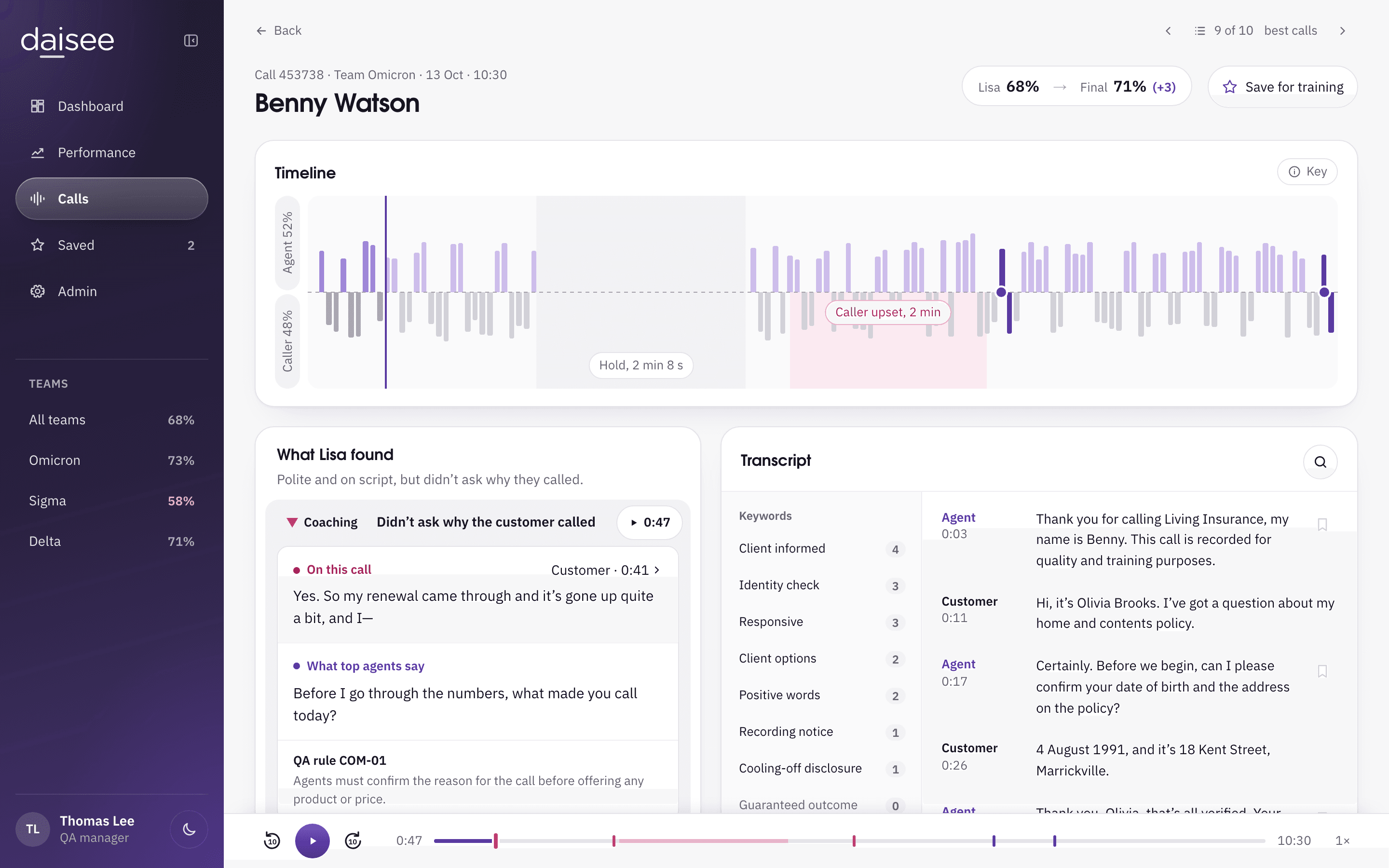
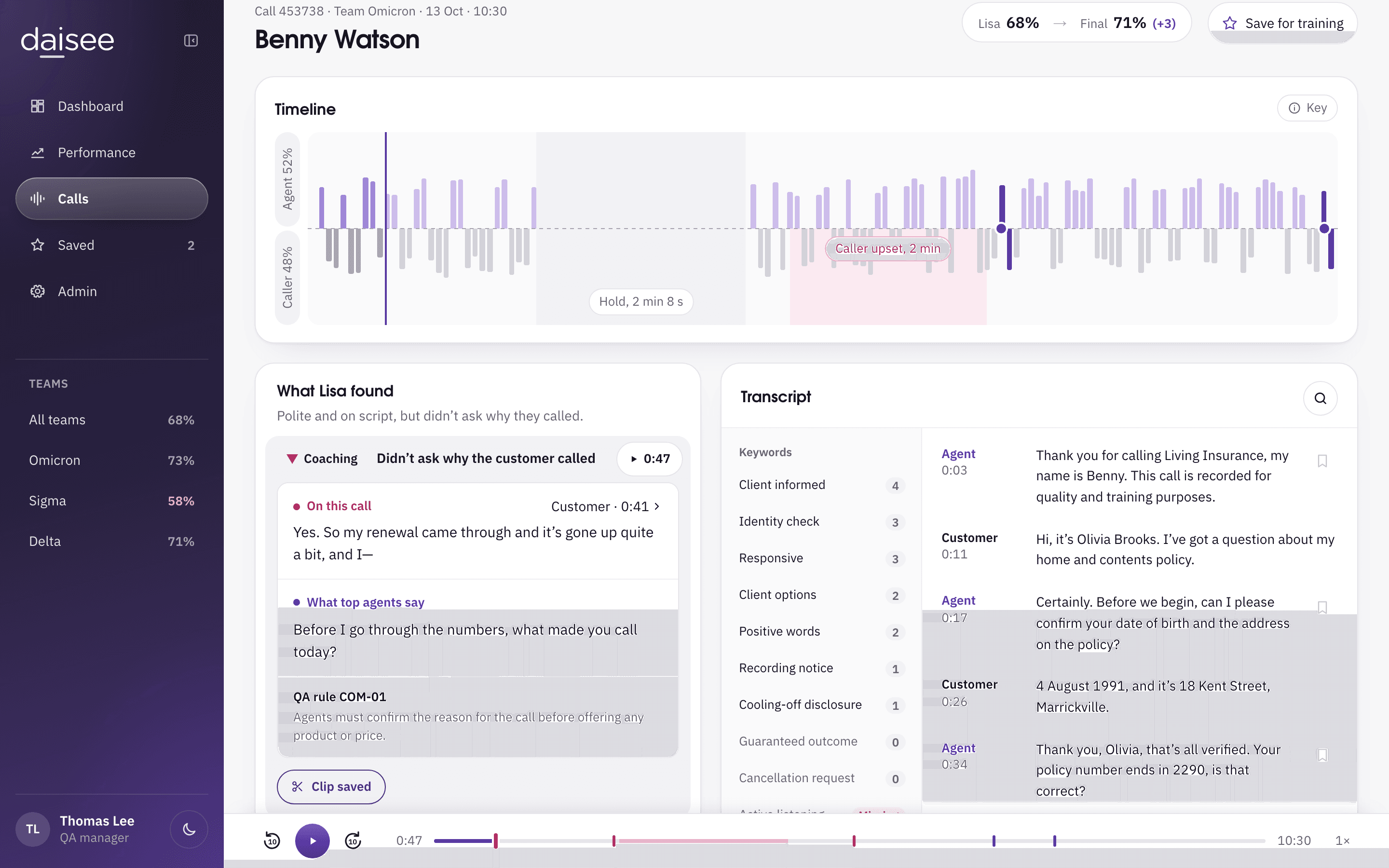
The call page opens on what Lisa found. Each finding plays its own moment of the call, and a reviewer can clip it for coaching.
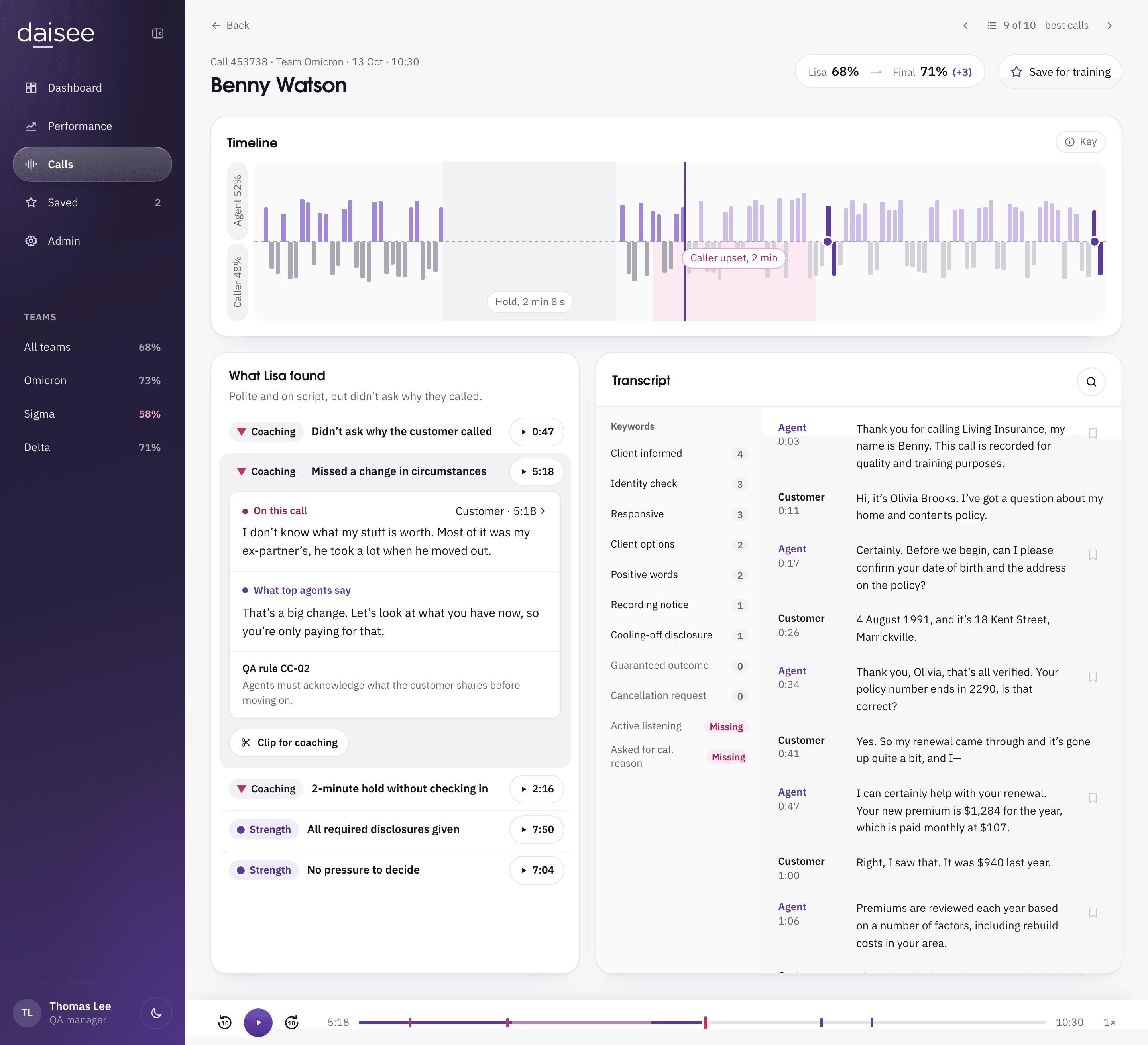
- Benny Watson’s call in Lisa: What Lisa found with play buttons on each finding, the missed change in circumstances open, beside the transcript. From the 2026 build made in Claude Design.
Required disclosures
Research need: search calls for what was and was not said.
Lisa checks every call for the required disclosures. Missing one is a compliance breach, and agents and reviewers see the same wording.
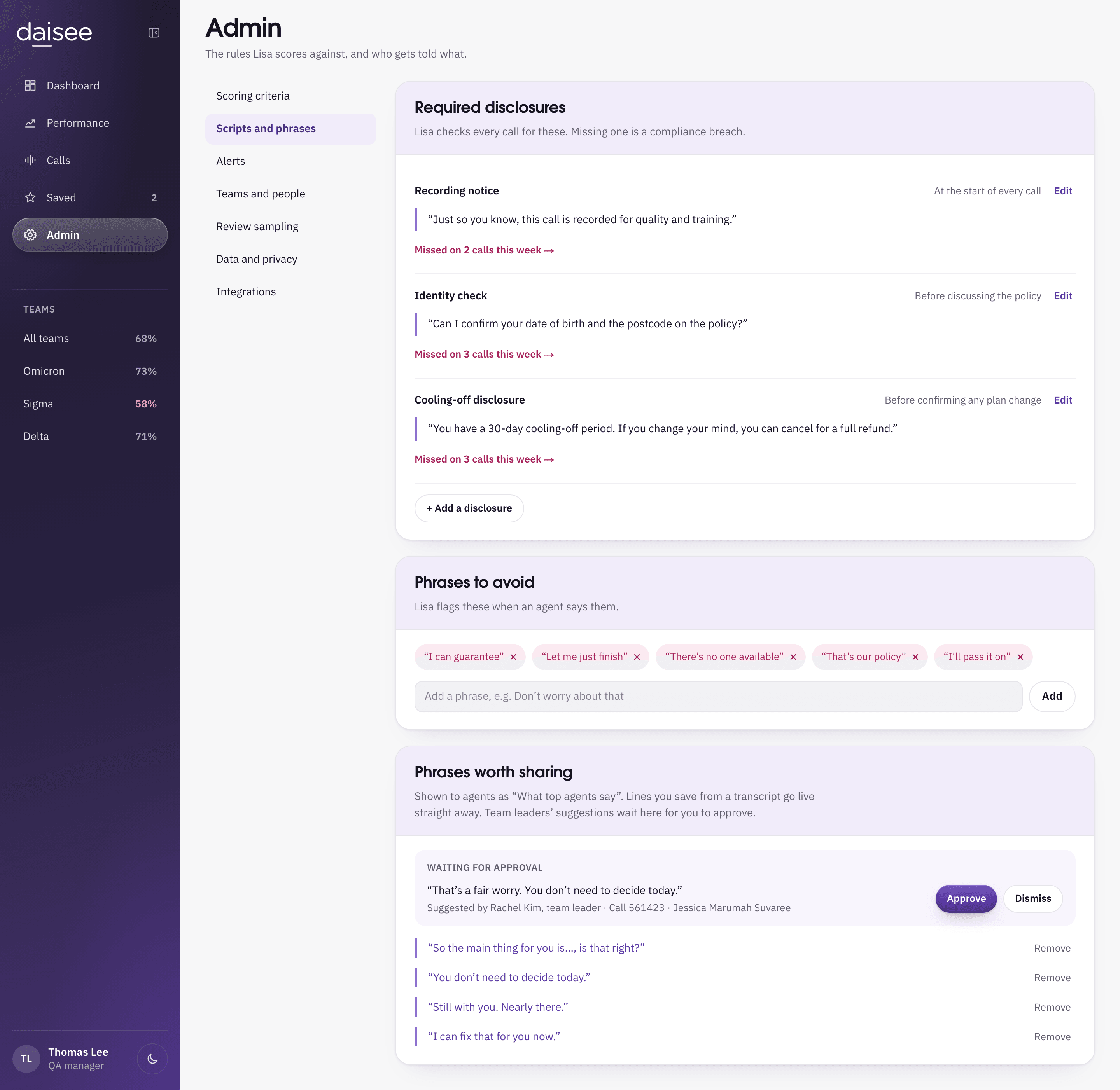
- Admin in Lisa, Scripts and phrases: Required disclosures, each with its approved wording and how many calls missed it this week, then Phrases to avoid and Phrases worth sharing. From the 2026 build made in Claude Design.
What top agents say
Research need: surface the scripting that improves customer sentiment, not sentiment data alone.
Phrases worth sharing wait for approval. Once approved, agents see them as what top agents say.
- Admin in Lisa, Scripts and phrases: Required disclosures and Phrases to avoid, then Phrases worth sharing, shown to agents as what top agents say, with one phrase waiting for approval. From the 2026 build made in Claude Design.
Lisa on a phone
I designed the phone version to work with the desktop, not to copy it. A reviewer away from their desk needs to know what went wrong and act on it quickly. Setting Lisa up can wait until they are back at a desk.
On the phone
- Alerts for breaches and complaints as they happen
- Start here, with what needs the reviewer first
- What Lisa found on a call, with each moment ready to play
- Approve or dismiss phrases from team leaders
Back on desktop
- Scoring rules and required disclosures
- Teams, review sampling and integrations
The phone still shows these, read only, with a note to edit on desktop.
Lisa in 2018 and 2026
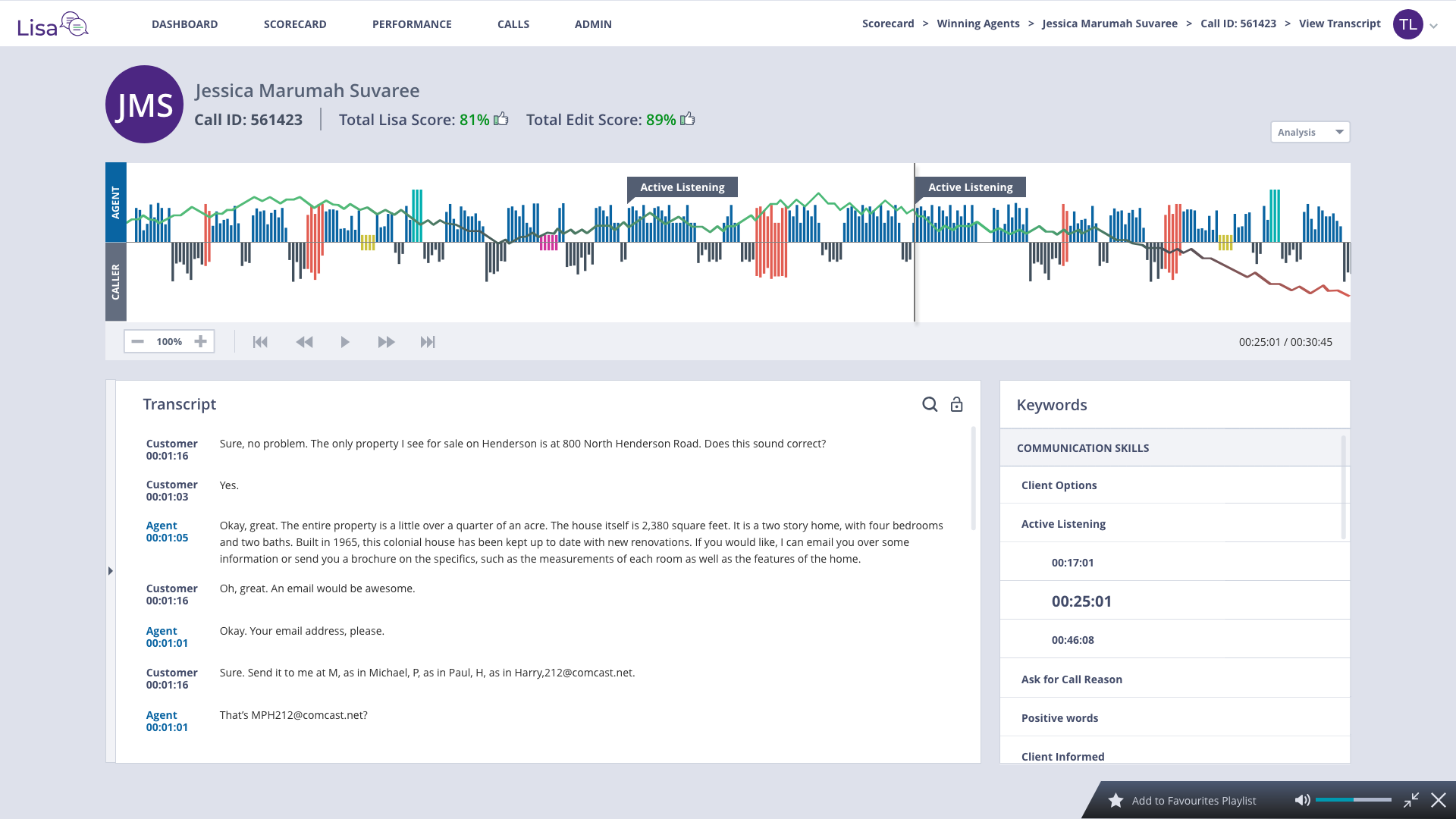
In 2018 the call page opened on the full transcript. In the rebuild I made it open on what Lisa found, because reviewers in the research wanted coaching insights without listening to long calls.

The outcome
These results come from the original work in 2018.
Achievements
- QA feedback
- Achieved positive feedback from 90% of Quality Assurance Managers and Officers for improved compliance monitoring and efficiency
- High risk behaviour
- Reduced high-risk behaviors and compliance breaches by 25% through UI of trend and performance reports
- Investors and early adopters
- Enabled sales executives and consultants to present the MVP, securing 3 new investors and early adopters